This shows you how to enable VRR (Variable Refresh Rate) in Xorg on Linux. This is useful for gaming and reducing screen tearing.
Enable VRR Xorg Conf
Create a new file in /etc/X11/xorg.conf.d/10-amdfreesync.conf
Section "OutputClass"
 Identifier "AMD"
 MatchDriver "amdgpu"
 Driver "amdgpu"
 Option "VariableRefresh" "true"
EndSection
Reboot and you will have it enabled. You can verify your monitor supports VRR with this command: xrandr --props | grep -i "vrr"
You can then verify it is enabled through the log file at /var/log/Xorg.0.log
Example output:
...
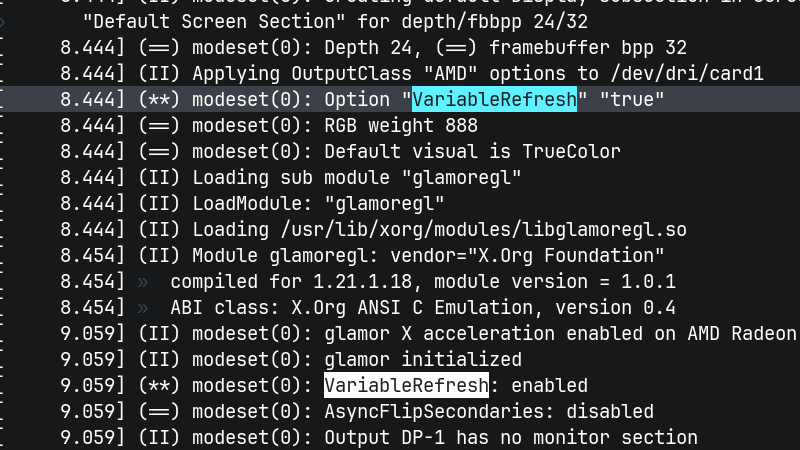
[     8.444] (II) Applying OutputClass "AMD" options to /dev/dri/card1
[     8.444] (**) modeset(0): Option "VariableRefresh" "true"
[     8.444] (==) modeset(0): RGB weight 888
[     8.444] (==) modeset(0): Default visual is TrueColor
[     8.444] (II) Loading sub module "glamoregl"
[     8.444] (II) LoadModule: "glamoregl"
[     8.444] (II) Loading /usr/lib/xorg/modules/libglamoregl.so
[     8.454] (II) Module glamoregl: vendor="X.Org Foundation"
[     8.454]  compiled for 1.21.1.18, module version = 1.0.1
[     8.454]  ABI class: X.Org ANSI C Emulation, version 0.4
[     9.059] (II) modeset(0): glamor X acceleration enabled on AMD Radeon RX 7800 XT (radeonsi, navi32, LLVM 20.1.8, DRM 3.64, 6.16.4-114.bazzite.fc42.x86_64)
[     9.059] (II) modeset(0): glamor initialized
[     9.059] (**) modeset(0): VariableRefresh: enabled
[     9.059] (==) modeset(0): AsyncFlipSecondaries: disabled
[     9.059] (II) modeset(0): Output DP-1 has no monitor section
[     9.059] (II) modeset(0): Output DP-2 has no monitor section
[     9.059] (II) modeset(0): Output HDMI-1 has no monitor section
[     9.064] (II) modeset(0): Output HDMI-2 has no monitor section
...


Comments
Comments load when this section comes into view.