
Using SFC and DISM is often done in haste and incorrectly. If you need to fix a corrupted install, then a special DISM command MUST BE issued.
View post by @christitustech on X
The Commands
Basic Online Command
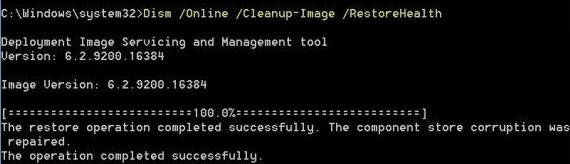
DISM /Online /Cleanup-Image /CheckHealthDISM /Online /Cleanup-Image /CheckHealthNote: This will check it’s health and cleanup basic corruption errors.
Command to Fix From Windows ISO
Use this command when the basic one fails. Follow these steps:
- Download the Windows ISO from https://www.microsoft.com/en-us/software-download/windows10ISO
- Mount the ISO and note the drive letter (ex. E:)
- Run DISM with sources flag
DISM /Online /Cleanup-Image /RestoreHealth /Source:E:\Sources\install.wimNote: install.wim is known as ESD in some downloads install.esd
Verify History and Logs
Did it run correctly? Was the corruption repaired?
Check the log file at %windir%\Logs\DISM\dism.log
SFC - The Worthless Tool
System file checker is WORTHLESS! In the best scenario it might tell you about some corruption, but I have never seen it actually repair anything.
Yet every damn guide on the internet recommends you run it. Save your time, and use DISM instead.





Comments
Comments load when this section comes into view.